Markdown to HTML Conversion: A Content Creator’s Workflow Guide
Most content operations problems do not start in search rankings. They start in the workflow.
A writer drafts in Google Docs. An editor adds comments. Someone copies the final version into a CMS. The formatting breaks. Headings become inconsistent. Inline styles multiply. Lists behave unpredictably. The SEO team cleans up HTML by hand. Then a developer removes extra spans and nested tags that never should have existed in the first place.
This is why more content teams are rethinking how they write and publish.
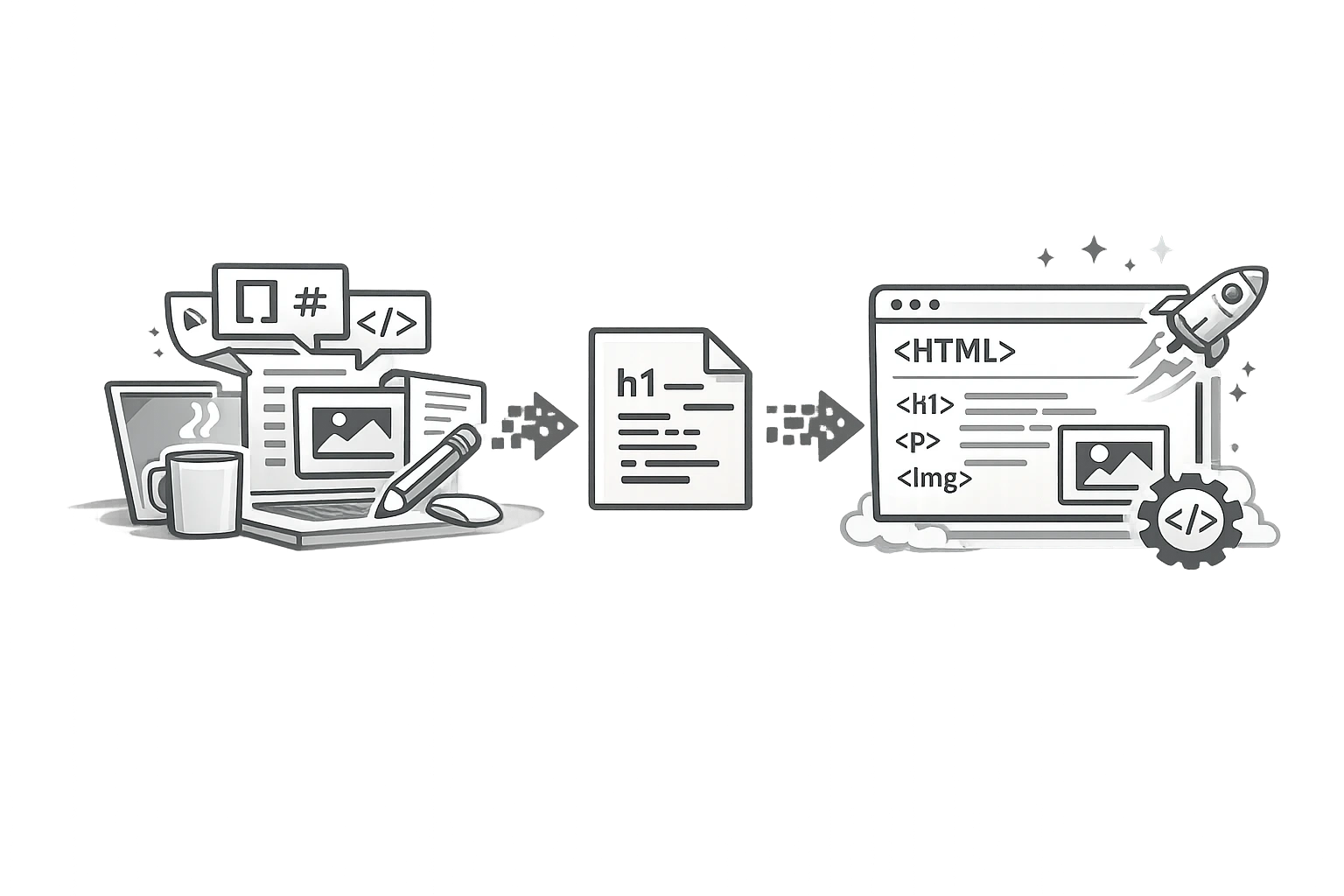
A cleaner, more scalable approach starts with Markdown and ends with structured HTML. That is why the markdown-to-HTML converter has become a useful tool not just for developers but also for writers, editors, SEO managers, and content ops teams.
Markdown gives teams a lightweight writing format that travels well between tools, versioning systems, AI workflows, and publishing platforms. HTML remains the web’s native publishing language. The smartest workflow uses both: write in Markdown, publish in clean HTML.
That shift is not just theoretical. According to the Stack Overflow Developer Survey 2025, Markdown continues to be the most admired documentation tool at 75.8%. That reflects a broader truth: people who create structured content at scale increasingly value formats that are portable, readable, and easy to maintain.
If your current process depends on copy-pasting from Word or Google Docs into a CMS, you are probably carrying hidden formatting debt. This guide explains why teams write in Markdown, where copy-paste workflows go wrong, and how a strong Markdown workflow produces cleaner HTML and better publishing outcomes.
Why do content teams write in Markdown?
Markdown is simple by design. It lets writers focus on structure and meaning rather than on visual formatting controls.
Markdown is readable in plain text
A writer can open a Markdown file in:
- a text editor
- a CMS field
- GitHub
- Notion-compatible environments
- documentation systems
- AI tools
- content ops pipelines
The file remains understandable without proprietary software.
Markdown separates writing from presentation
This is the key workflow benefit.
Writers define:
- headings
- lists
- links
- quotes
- emphasis
- code or content blocks
The site stylesheet defines how those elements look when converted to HTML and published.
That reduces formatting inconsistency and keeps editorial effort focused on content quality.
Markdown fits collaborative, versioned content
GitHub reports that its platform serves more than 150 million developers and hosts over 420 million projects. While not every content team uses Git, the scale of the ecosystem helps explain why Markdown became a standard for structured writing and documentation workflows. It is portable, diff-friendly, and resilient.
For content teams managing blog posts, knowledge bases, help centres, or AI-ready content libraries, those same advantages apply.
The pitfalls of copy-pasting from Word and Google Docs
Copy-paste seems fast until it is not.
Hidden formatting creates messy HTML
When content is copied from visual editors into a CMS, the HTML often includes:
- inline styles
- unnecessary spans
- non-semantic line breaks
- malformed lists
- extra classes
- pasted font declarations
- inconsistent heading levels
The visible post may look acceptable at first. But under the hood, the markup is cluttered.
That clutter creates downstream problems
Messy HTML can lead to:
- harder QA
- inconsistent rendering
- accessibility issues
- template conflicts
- slower editing
- SEO cleanup work
- unreliable reuse across channels
This is especially painful for teams publishing at volume.
Copy-paste also weakens content governance
With Word and Docs workflows, structure often depends on visual formatting choices rather than content rules. One writer uses bold text as a heading. Another inserts blank lines for spacing. Another pastes tables that break on mobile.
The result is not just messy code. It is inconsistent with publishing standards.
Word/Docs copy-paste vs. Markdown-to-HTML workflow
| Workflow element | Word/Docs copy-paste | Markdown-to-HTML workflow |
|---|---|---|
| Authoring experience | Familiar but formatting-heavy | Lightweight and structure-focused |
| HTML output | Often cluttered | Usually cleaner and more predictable |
| Semantic consistency | Varies by user behaviour | Easier to standardise |
| CMS cleanup | Frequent | Minimal |
| Reusability | Lower | Higher |
| Version control | Limited | Strong |
| SEO readiness | Requires cleanup | Easier to optimise from the start |
Why is clean HTML better for SEO and publishing quality?
A markdown-to-HTML workflow is not automatically better because it is trendy. It is better because it improves output quality.
1. Semantic HTML is easier for search and accessibility systems to interpret
When Markdown is converted correctly, it typically maps cleanly to:
<h1>through<h3>style hierarchy- paragraphs
- lists
- blockquotes
- links
- tables
That improves structure and helps search engines interpret page organisation more reliably.
2. Cleaner markup reduces noise
Search systems can parse cluttered HTML, but that does not make clutter desirable. Cleaner markup:
- simplifies QA
- reduces editor error
- improves maintainability
- lowers the chance of broken layouts
- makes future migrations easier
3. Consistent structure supports stronger internal linking and on-page SEO
When content teams use structured authoring, they are more likely to apply:
- consistent heading logic
- descriptive anchor text
- repeatable CTA patterns
- cleaner sectioning
- reusable components
That is good for search performance and equally good for editorial operations.
A practical markdown workflow for content creators
The best content creator workflow does not require everyone to become technical. It requires a repeatable system.
Step 1: Draft in Markdown
Writers create the initial article using plain text and basic Markdown syntax for:
- headings
- bullet lists
- links
- tables
- emphasis
This keeps the draft focused on structure, clarity, and argument.
Step 2: Edit in the same structured format
Editors review:
- Flow
- Messaging
- SEO alignment
- Heading logic
- Link placement
- CTA structure
Because the file is lightweight, it is easier to catch structural issues early.
Step 3: Convert Markdown to HTML
At publishing time, use a tool such as the CampaignMorph HTML/Markdown Converter to convert the structured Markdown file into cleaner HTML for your CMS. This is especially useful when teams want a fast, repeatable way to preserve structure without inheriting the formatting clutter common in copy-paste workflows.
Step 4: QA the rendered page
Review:
- heading order
- list styling
- links
- tables
- embedded media
- mobile layout
- schema or component integration if applicable
Step 5: Publish and reuse
Because the source remains in Markdown, the content is easier to:
- republish
- localize
- version
- convert to email or documentation formats
- store in AI-ready content libraries
Best practices for Markdown-to-HTML conversion
A good converter workflow depends on a few standards.
Use heading levels intentionally
Do not skip from H1 to H4 just because the visual design looks better. Use semantic order.
Keep links descriptive
Avoid:
- “Click here”
- “Learn more”
- “Read this”
Use meaningful anchor text that explains the destination context.
Treat tables and lists as content structures, not layout hacks
Markdown makes it easier to preserve intent. Use tables for comparisons and lists for grouped information, not for visual spacing.
Standardise reusable content blocks
If your team publishes author bios, disclosures, CTAs, or FAQs, define how they should be rendered in Markdown and how they should be consistently converted to HTML.
Common mistakes in Markdown workflows
Markdown is powerful, but teams still need process discipline.
Common issues include:
- inconsistent heading usage
- missing front matter or metadata
- broken tables from rushed formatting
- publishing raw Markdown without proper QA
- assuming all converters produce equally clean HTML
- forgetting how the CMS template wraps converted content
The fix is not more complex. It is a documented workflow.
Why does this matter for content ops teams?
A modern content pipeline must support:
- Human writers
- Editors
- SEO reviewers
- CMS publishers
- Developers
- AI-assisted drafting and reuse
Markdown works well because it spans all those functions. HTML remains the publication layer. A strong Markdown-to-HTML converter bridges them cleanly.
That matters even more as teams produce content at scale. The more articles, landing pages, documentation pieces, and repurposed assets you manage, the more costly formatting chaos becomes.
Where does CampaignMorph fit?
The CampaignMorph HTML/Markdown Converter is useful for teams that want cleaner handoffs between drafting and publishing. Instead of relying on messy copy-paste behaviour from Word or Docs, you can maintain a structured Markdown source and convert it into publishable HTML when needed.
That means fewer formatting surprises, cleaner output, and a workflow that scales better as your library grows.
Simplify the pipeline, improve the output
Writers should spend their time writing. Editors should spend their time improving clarity and performance. SEO teams should optimise content, not scrub out random formatting debris from a copied document.
That is why a Markdown-first workflow makes sense. It keeps the source clean, the structure consistent, and the final HTML easier to publish and maintain.
If your current process involves endless CMS cleanup, it is time to rethink the pipeline. Start drafting in Markdown, convert systematically, and build a more reliable content operation with the CampaignMorph HTML/Markdown Converter.
Publishing technical blog posts or developer documentation? Explore our end-to-end Technical Content Publishing Pipeline Guide to see how Markdown conversion combines with visual table generators, beautified code screenshots, and custom OG social cards.
Test one upcoming article with a Markdown-first workflow, convert it to clean HTML, and compare how much editing time you save before publishing.
Share this article
Help other marketers, developers, and creators discover these insights.