Image Mask Generator: Apply Custom Shapes & Blobs to Photos Online
Break out of the box: Why image masks matter.
For decades, the web has been defined by rigid rectangles and sharp squares. But modern web design demands something more organic and dynamic.
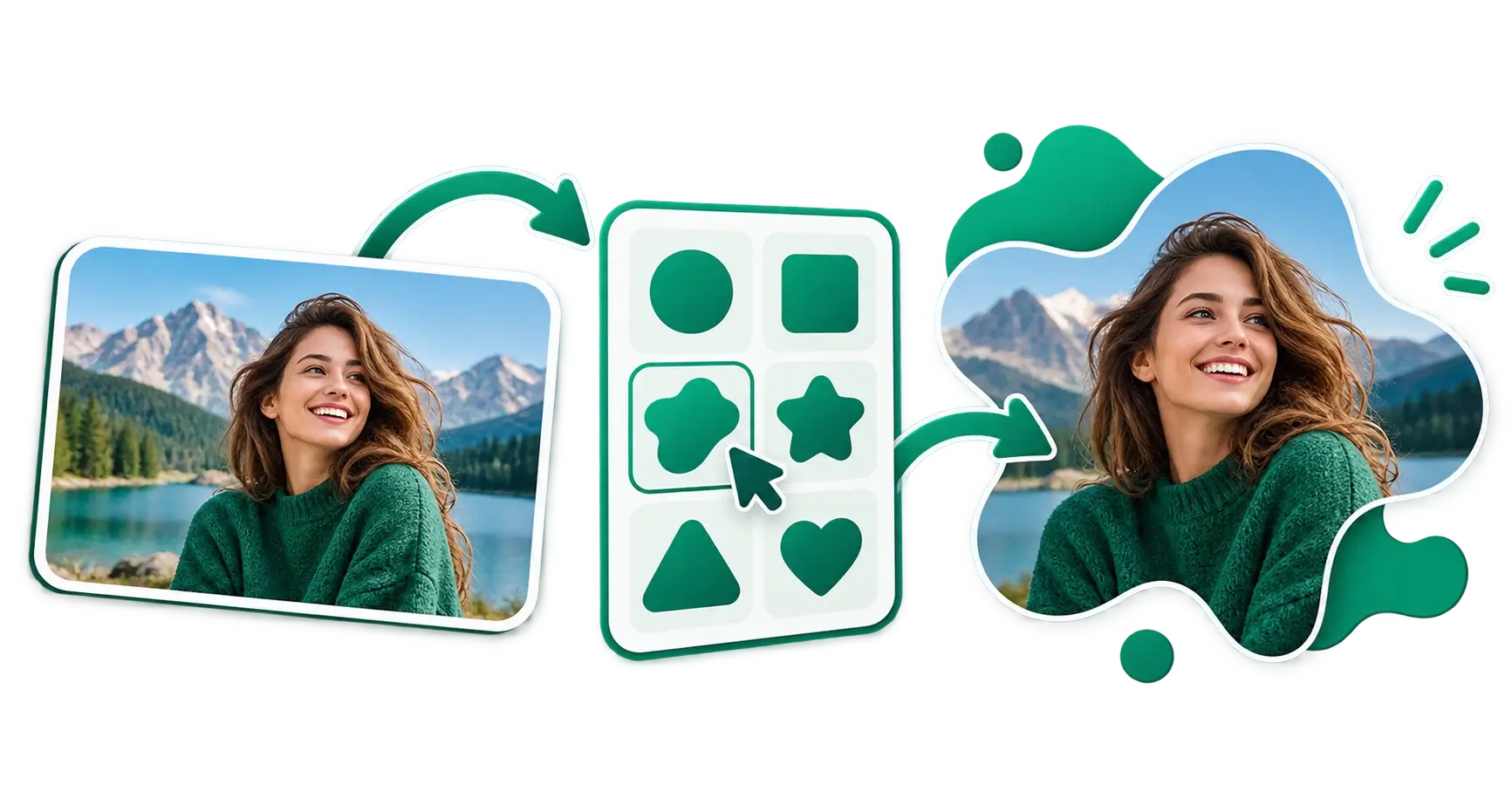
Image masks allow you to apply custom shapes like smooth, flowing blobs, sharp geometric polygons, or completely custom paths to your photographs. Instead of a boring rectangular headshot on your "About Us" page, an image mask lets you clip that photo into a beautiful, abstract shape that seamlessly blends into your website's background.
Using CSS clip-path is a great way to do this in code, but what if you need the actual image file to use in a presentation, a social media graphic, or an email newsletter? That's where a dedicated generator comes in.
What does the Image Mask Generator do?
The CampaignMorph Image Mask Generator is a free, browser-based tool that allows you to instantly apply custom shapes to your photos and download the result as a transparent PNG.
Core features
- Organic Blob Masks: Generate smooth, random, organic shapes with a single click. Adjust the complexity and randomness to get the perfect blob for your design.
- Geometric Polygons: Prefer sharper edges? Switch to polygon mode to create striking geometric masks (triangles, hexagons, octagons, etc.).
- Live Preview: See your image perfectly clipped to the shape in real-time as you adjust the parameters.
- Transparent Export: Download your newly masked image as a high-resolution PNG with a fully transparent background, ready to be dropped into any design software or website.
- 100% Private: The tool runs entirely locally in your web browser. Your photos are never uploaded to our servers.
How to use the Image Mask Generator: Step-by-step
Step 1: Upload your image
Click the upload area or drag and drop your photo into the tool. High-quality JPEGs or PNGs work best.
Step 2: Choose your mask type
Select whether you want an Organic Blob or a Geometric Polygon.
- Blobs are perfect for friendly, modern, and approachable designs.
- Polygons are ideal for tech, corporate, or edgy branding.
Step 3: Customise the shape
Use the built-in sliders to generate new shapes.
- For blobs: adjust the "complexity" (how many curves) and the "contrast" (how jagged or smooth the curves are). Click the randomise button until you find a shape you love.
- For polygons: adjust the number of sides and rotation.
Step 4: Position your image
Click and drag your image within the mask to ensure the subject is perfectly framed inside the shape. You can also use the zoom controls to scale the image up or down within the mask bounds.
Step 5: Export as PNG
Once you are happy with the framing, click Download. The tool instantly generates a transparent PNG file that perfectly preserves the edges of your new shape.
Top use cases for Image Masks
1. Team Profile Pictures (About Us Pages)
Standard circular profile pictures are overused. By applying a subtle organic blob mask to your team's headshots, your "About Us" page immediately looks bespoke, modern, and high-end.
2. Website Hero Sections
A large, masked image floating alongside your main headline is a staple of modern SaaS and agency websites. It softens the layout and draws the user's eye naturally down the page.
3. Testimonial Graphics
When showcasing customer quotes on social media, using a polygon or blob mask for the customer's photo adds visual interest. It stops the scroll much better than a standard square inset.
4. Presentation Decks (PowerPoint/Keynote)
Slide decks often look rigid. Dropping in transparent PNGs of masked images allows your photos to interact beautifully with your slide's background colours and gradients.
Frequently asked questions
1. Is the Image Mask Generator free? Yes. The tool is 100% free with no watermarks, no sign-up required, and no hidden limitations.
2. Does this use CSS clip-path?
While the tool uses similar logic to display the preview, it actually processes the image data directly onto a canvas so you can download a real, tangible PNG file. If you are looking strictly for CSS code to animate masks, check out our CSS Shape Animator.
3. Are my photos safe? Absolutely. We designed the Image Mask Generator with privacy first. All image processing happens locally within your device's browser. We do not store or see your photos.
4. Why is the background transparent? By exporting as a transparent PNG, the masked image can be placed over any background colour, gradient, or pattern in your final design without showing a white or black box around it.
Try the Free Image Mask Generator
Ready to break out of the box? The CampaignMorph Image Mask Generator lets you apply stunning custom shapes to your photos in seconds.
Building a full production website or landing page? Learn how image masks fit into our complete Frontend Web Asset Pipeline Guide alongside background removal, WebP conversion, and Core Web Vitals optimization.
For other aesthetic design tasks, be sure to explore the Profile Picture Maker, 3x3 Photo Collage Maker, and our Background Remover.
Share this article
Help other marketers, developers, and creators discover these insights.